[04] Cook Instead

Project Overview
Role: UX/UI Designer
Timeline: 8 Weeks
Target Users: Frequent Takeout & Grocery App Users
Focus Areas: Vision Pro Spatial Design, Guided Cooking, Recipe Discovery, Ingredient Shopping, Habit Building
Cook Instead is an Apple Vision Pro cooking experience designed to help people who frequently rely on takeout transition toward cooking more meals at home. Many users want to cook but feel discouraged by unclear recipes, lack of confidence, or the added effort of planning meals and shopping for ingredients.
This project focused on using spatial design and immersive interactions to reduce friction in the cooking process. Through browsing recipes catered to your preferences, POV-style tutorials, clear step-by-step guidance, and integrated ingredient ordering, Cook Instead supports users in building confidence and sustainable cooking habits at home.
Problem
As food delivery becomes the default for convenience, many people find home cooking intimidating, time-consuming, or unenjoyable. While users want healthier and more affordable options, the effort required to plan recipes, shop for ingredients, and follow instructions often pushes them back toward takeout.
With more people working remotely or in hybrid settings, there is a growing opportunity to reimagine cooking as an experience that feels just as accessible, guided, and enjoyable as ordering food online.
Why it matters?
-
57% of Americans prefer takeout or delivery, making convenience the default (Escoffier)
-
50% of people say they hate cooking, despite wanting to eat at home (Harvard Business Review)
-
Remote work has more than doubled, increasing time spent at home (U.S. Census Bureau)
-
AR & VR adoption is growing rapidly, with revenue projected to reach $46.6B by 2025 (Statista)
In what ways can we redesign the cooking experience to make it as convenient and enjoyable as ordering food?
Competitive Analysis
This competitive analysis highlights how existing food delivery, grocery app, and guided cooking app prioritize convenience and scale but lack integrated, engaging cooking experiences that support learning, immersive guidance, and habit-building at home.

Goals &
Success Criteria
User-Focused Goals
-
Make cooking feel approachable and easy
-
Reduce friction with clear, guided steps
-
Support hands-free cooking in a spatial environment
-
Encourage cooking at home over takeout
Success Criteria
-
Users can follow recipes without confusion
-
Steps and ingredients are easy to see at a glance
-
Interface stays usable during active cooking
-
Users feel more confident cooking at home
Visual Direction & Mood
This visual exploration helped define the tone of the experience, combining clear, legible typography with warm, food-inspired colors to make cooking feel less intimidating and more enjoyable. The goal was to create a design that feels inviting while remaining practical in a real kitchen setting.


Ideation
Here are my initial thoughts through sketches reflecting my market research, competitive analysis, and goals for the app.
The low-fidelity sketches give a first look at Cook Instead layout with key functions.


User Interview Insights
Early concepts for the Apple Vision Pro experience were tested with six participants through guided discussions and walkthroughs. Participants reviewed feature ideas and sketch-based layouts to understand how the experience might work and provided feedback on clarity, usefulness, and overall direction.
Jack
Shelby
Zach
Kaylee
Kimberly
Jennifer
Visual-First Home Browsing
Users shared that the home screen plays a key role in motivating them to cook. Appealing food visuals and clear, easy to read text will help them decide whether to commit to the app or a recipe.
“If the homepage looks good and the food looks doable, I’m way more likely to actually cook instead of ordering out.”
Ingredients Should Be Easy to Scan
Long ingredient lists felt overwhelming when they were too text-heavy. Users wanted more spacing and visual grouping to make shopping and prep feel manageable.
“Long ingredient lists stress me out. Breaking it up visually would make it feel more manageable.”
Familiar Layouts Feel Easier
Users preferred layouts that felt familiar and predictable, similar to other popular apps that they frequently use. Familiar patterns can make the experience easier to navigate and reduced friction.
“I don’t want to think too hard about how to use it...if it feels familiar, I’ll just jump right in.”
POV Guidance with Backup Help
POV cooking guidance was highly valued for showing exactly how to perform tasks. Users also wanted a quick way to get clarification if questions came up mid-cooking.
“Seeing it from a first-person view makes it click for me since I'm a visual learner but I’d still want a quick way to double-check if I’m unsure.”
High-Fidelity Wireframes
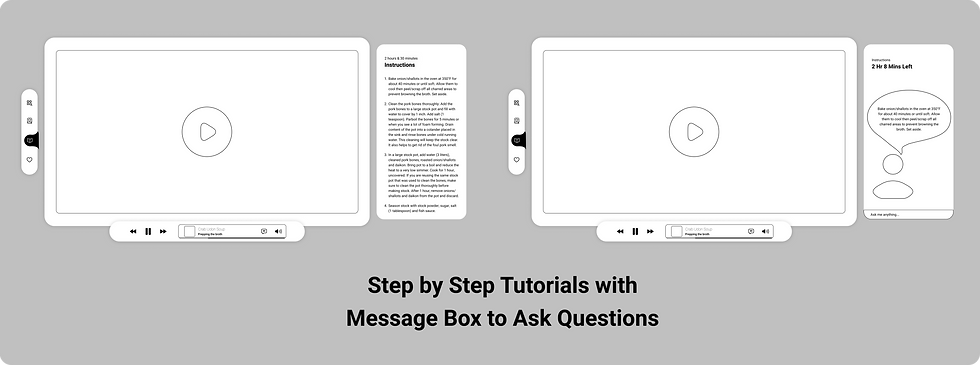
After incorporating user feedback and refining the project’s main goals, I created high-fidelity wireframes for a second round of user testing before moving into final UI design.



Main Features
Based on my sketches and analyzing the feedback from the second round of user testing for Cook Instead, I’ve outlined four main features. I'll walk through how these features integrate into the design to create an immersive and motivating experience for the targeted users.
Order ingredients directly to their door, just like online shopping.
Stay at Home!
Offer real-time AI help for cooking questions and tutorial guidance.
A Helping Friend
Provide tailored recipes based on dietary needs and allergies.
Your dish,
Your way
Create a fun cooking environment with rewards and progress tracking.
Cook More, Earn More
Final Design
Introducing Cook Instead: a first-person cooking experience that helps users cook at home with confidence using immersive guidance and rewards that encourage consistency.
Home | Browsing through Various Recipes

My final UI design for the homepage is focused on easy navigation, drawing inspiration from the user-friendly interface of popular streaming apps like Netflix. Recipe recommendations are personalized based on your preferences, and the system will suggest other cuisines within the same ethnic food group. Additionally, the top ten recipes are curated based on user likes, popular choices, and trending dishes.
Home | What are you Cooking?


Next to the dish image, there's a curved bar that provides key details like the estimated cooking time and calorie content for a standard serving, helping users stay on track with their calorie deficit goals.
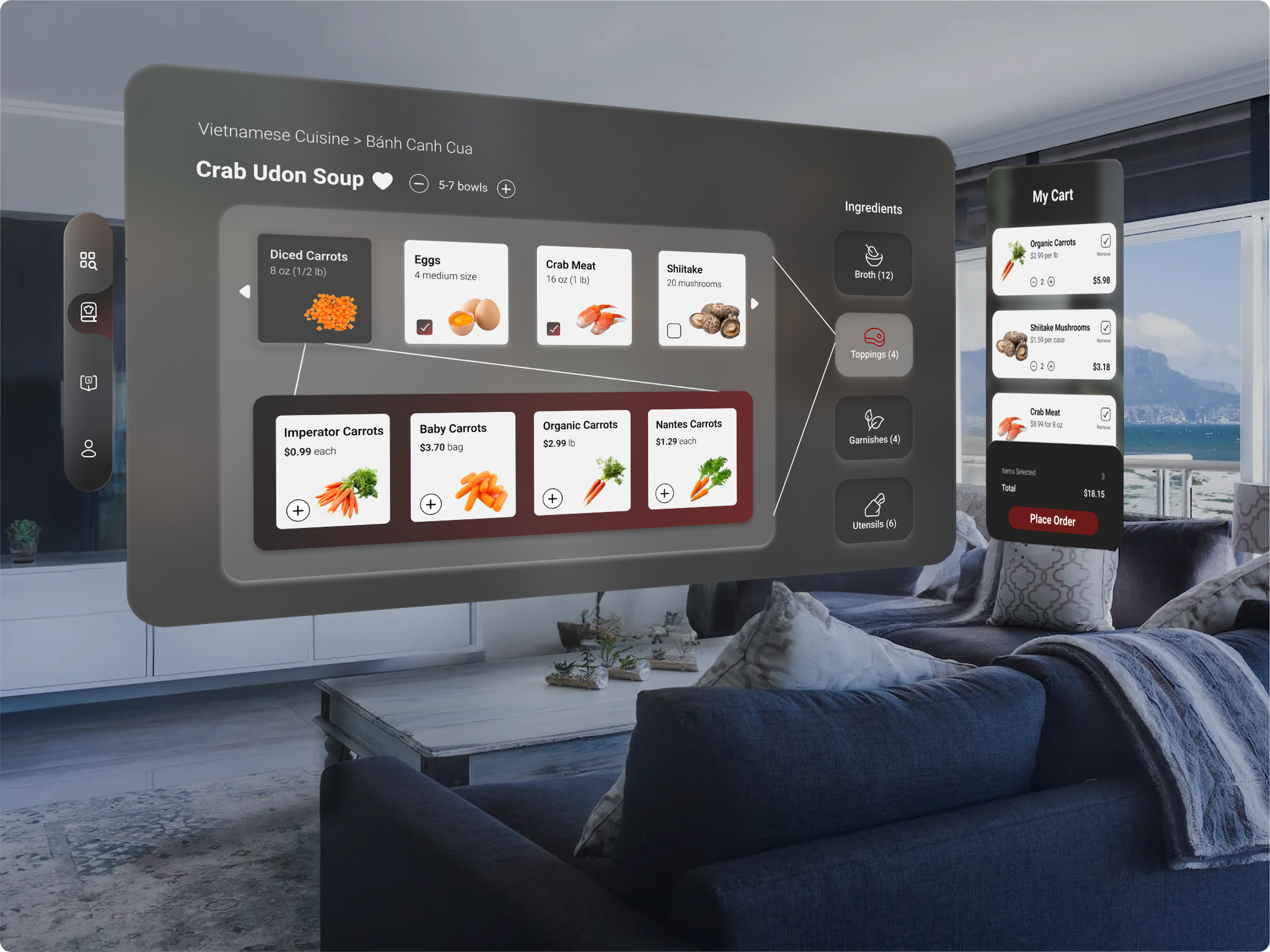
Ingredients | Customize Ingredients & Check Out Cart

Obviously, there are many variations within a single type of cuisine. I wanted to highlight how flexible and versatile the recipes are, adapting to your personal preferences. For example, I’m not a fan of baby carrots (I know, I know), but this feature recommends me similar ingredients as an alternative so I can easily swap them out and add the substituted ingredient into the cart.
After users explore the recipes, which are divided into four categories based on the dish, like broth, toppings, garnishes, and utensils for Crab Udon Soup, they’ll have the option to order only the ingredients they need to recreate the meal.
Tutorials | POV Cooking Tutorials with AI Assistant


Tutorials are designed to be recorded from a first-person perspective, similar to using recording glasses. This approach allows users to easily follow along, step by step, seeing the process from the same viewpoint.


You can easily text your assistant with questions about any steps you find confusing. This feature is especially helpful for beginners, making the transition to cooking smoother and providing clarification when text instructions are confusing for user.
Profile | Motivation Corner to Start Cooking More for Better Rewards

1. Personalize your food preferences to match your tastes, dietary needs, and allergies. Whether you love spice, prefer vegetarian options, or need to avoid allergens, Cook Instead keeps you in control.
2. The more you cook, the more benefits you unlock. As you continue to use Cook Instead, you’ll earn points and level up, unlocking exclusive rewards. These rewards could include discounts on ingredients, free cooking tools, or access to premium recipes. The higher your cooking level, the better the rewards. Keep cooking to level up and enjoy even more perks!
Reflection & Key Takeaways
My Key Takeaways
-
Developing a unique app is complex when there aren’t much similar apps
-
It's okay to draw inspiration from others as long as it's not identical
-
Clearly understand your target audience and define their problems
-
Simple, minimal designs can be more effective than aesthetic preferences
Next Steps
-
Design onboarding page before homepage.
-
Ask questions to understand user preferences instead of manual input.
-
Redesign for mobile app.
-
Add social feature for sharing recipes, tips, and cooking successes to build community.